CLI Reference#
All commands are run from the agent binary. Release artifacts are named with the OS and architecture (e.g. senhub-agent_linux_amd64, senhub-agent_windows_amd64.exe). Examples in this page assume the binary has been renamed to senhub-agent (Linux/macOS) or senhub-agent.exe (Windows) — see the Installation guide for the full list. If you keep the original filename, substitute it in every command.
Service Management#
| Command | Description |
|---|---|
install | Install as system service |
uninstall | Remove the system service |
start | Start the service |
stop | Stop the service |
restart | Restart the service |
status | Show service status and health |
run | Run interactively in console mode |
Run (Console Mode)#
senhub-agent run
senhub-agent run --verbose
senhub-agent run --filter probe.veeam
The agent auto-detects its operating mode from the configuration file. The --offline flag is no longer required.
| Flag | Description |
|---|---|
--verbose, -v | Enable debug logging for all modules |
--filter MODULES | Filter debug logs by module prefix (implies verbose) |
--config-path PATH | Configuration file path (default: ./agent-config.yaml) |
Debug Filter Examples#
senhub-agent run --filter probe.veeam           # Veeam probe only
senhub-agent run --filter probe                  # All probes
senhub-agent run --filter strategy.http,sensor   # HTTP API + probe management
Use debug-modules-list to see all available filters.
Configuration#
config check#
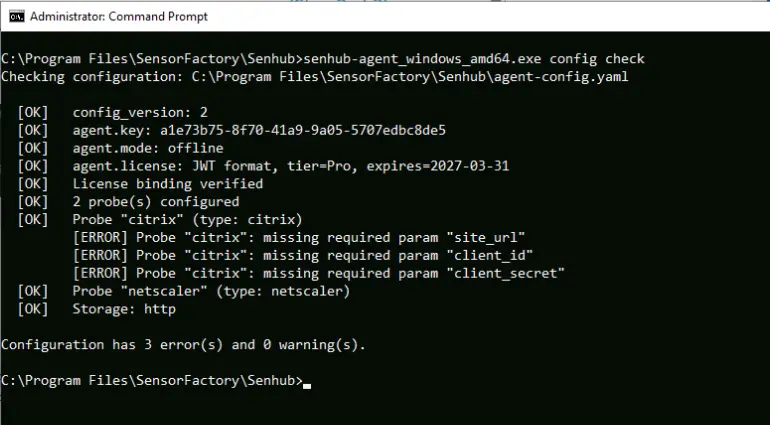
Validates a configuration file and reports errors and warnings.
senhub-agent config check
senhub-agent config check /path/to/agent-config.yaml
Checks performed:
- YAML syntax (with line-level error context)
- Required fields (
config_version,agent.key,agent.mode) - License validity and agent binding
- Probe types against the registry
- Required probe parameters (endpoint, credentials)
- Storage strategy names
debug-modules-list#
Lists all available debug filter names.
senhub-agent debug-modules-listUpdate#
Check for updates#
senhub-agent updateChecks if a newer version is available and displays it.
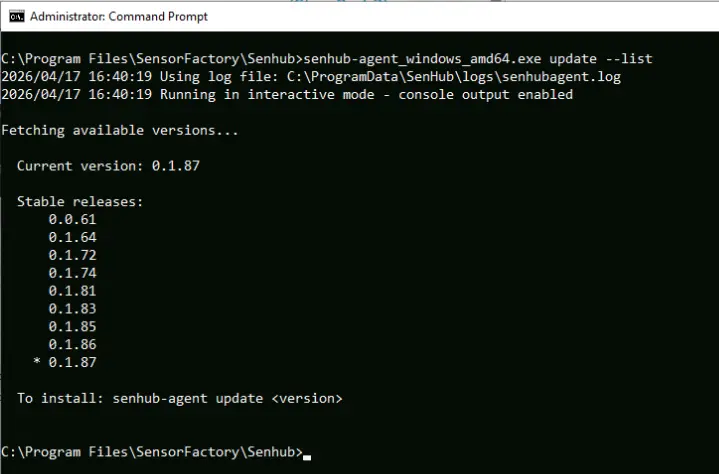
List available versions#
senhub-agent update --listLists all stable versions. If auto_update.include_beta: true is set in the configuration, beta versions are also listed.
Install a specific version#
senhub-agent update 0.1.87Downloads and installs the specified version. Restart the service to apply.
License#
Show license status#
senhub-agent license showActivate a license#
senhub-agent license activate SH-040GMS-000100-02S3S2-HC3HMV-7RBZ4Y-PYValidates the license and saves it in the configuration file.
Remove license#
senhub-agent license removeReverts to free tier (cpu, memory, logicaldisk, network only).
Other#
| Command | Description |
|---|---|
version | Show agent version and build information |